Version 1.0.5 • Windows 10/11 • Please contact support for activation.
100% local processing
8 & 12-digit HS code validation
Windows 10/11
Workflow
From spreadsheet to submission in three steps
No manual re-typing, no separate validation tools — the whole conversion happens on your PC.
1
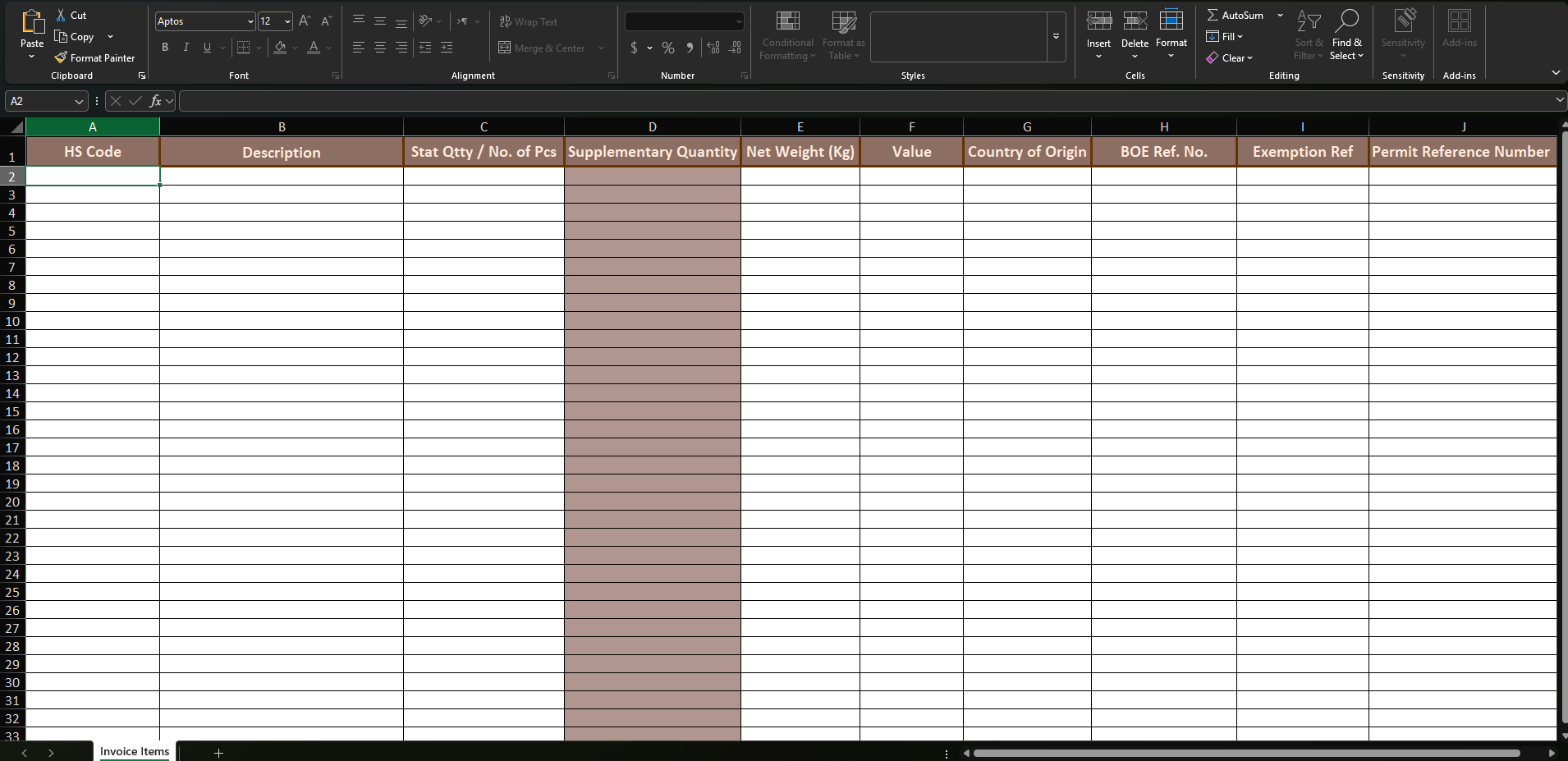
Upload your Excel invoice
Drop in the invoice spreadsheet exactly as you already prepare it — no reformatting required.
2
Automatic validation
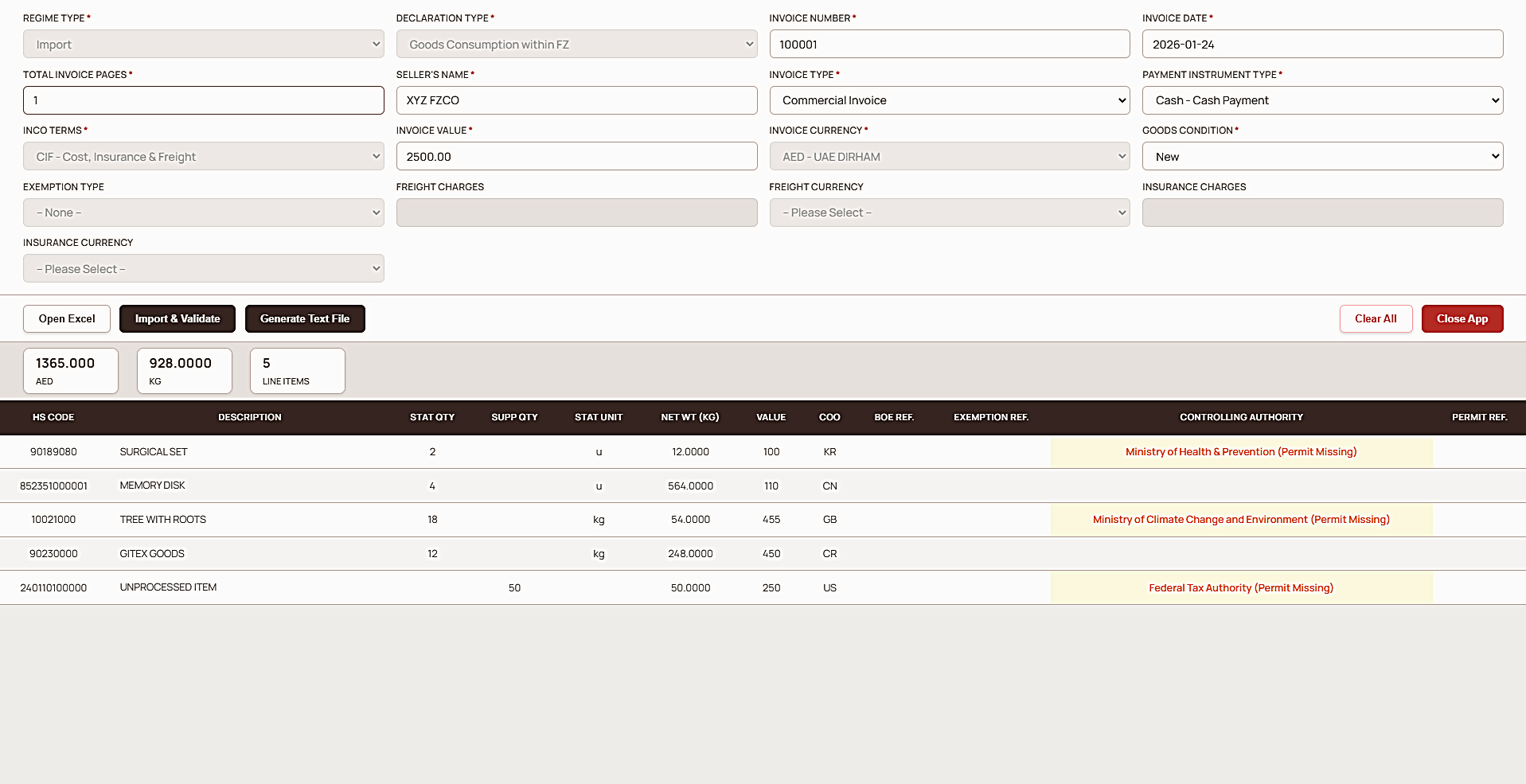
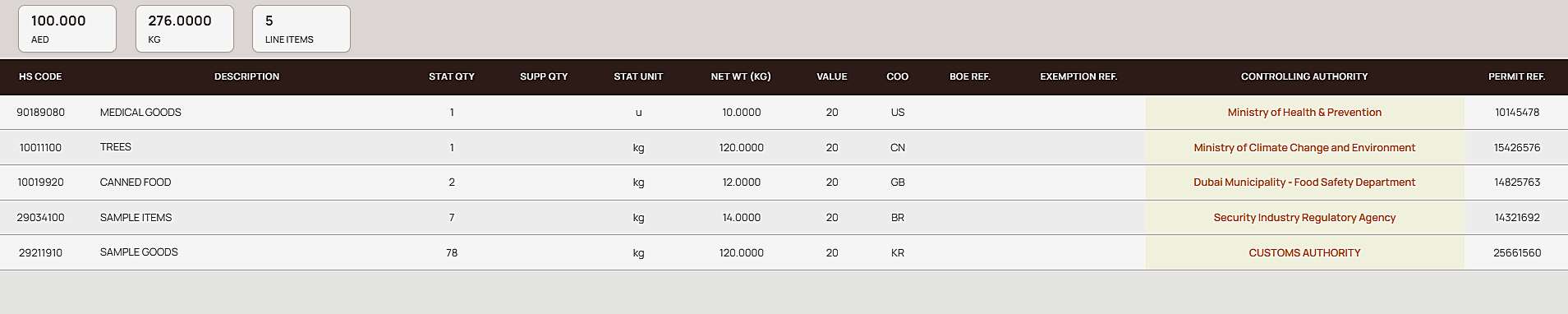
HS codes, controlling authority flags, and unit-of-measure consistency are checked before export.
3
Export Mirsal 2 XML
Get an upload-ready declaration file for Dubai Trade — generated locally, ready to submit.
Why M2 Generator
Automated customs declaration for freight forwarders and clearance companies
Every part of the workflow is designed around accuracy, speed, and keeping your data on your device — built for freight forwarders, customs clearance companies, and logistics teams operating in the UAE.
Instant Conversion
Drop in Excel files and produce Mirsal 2-compliant XML instantly — no fiddly exports.
100% Private
All processing occurs locally on your PC. No files leave your system — guaranteed.
Smart Validation
HS code checks and basic rules applied to prevent common declaration errors before export.
0%
Cloud dependency
100%
Local, on-device processing
8 & 12-digit
HS code validation coverage
See it in action
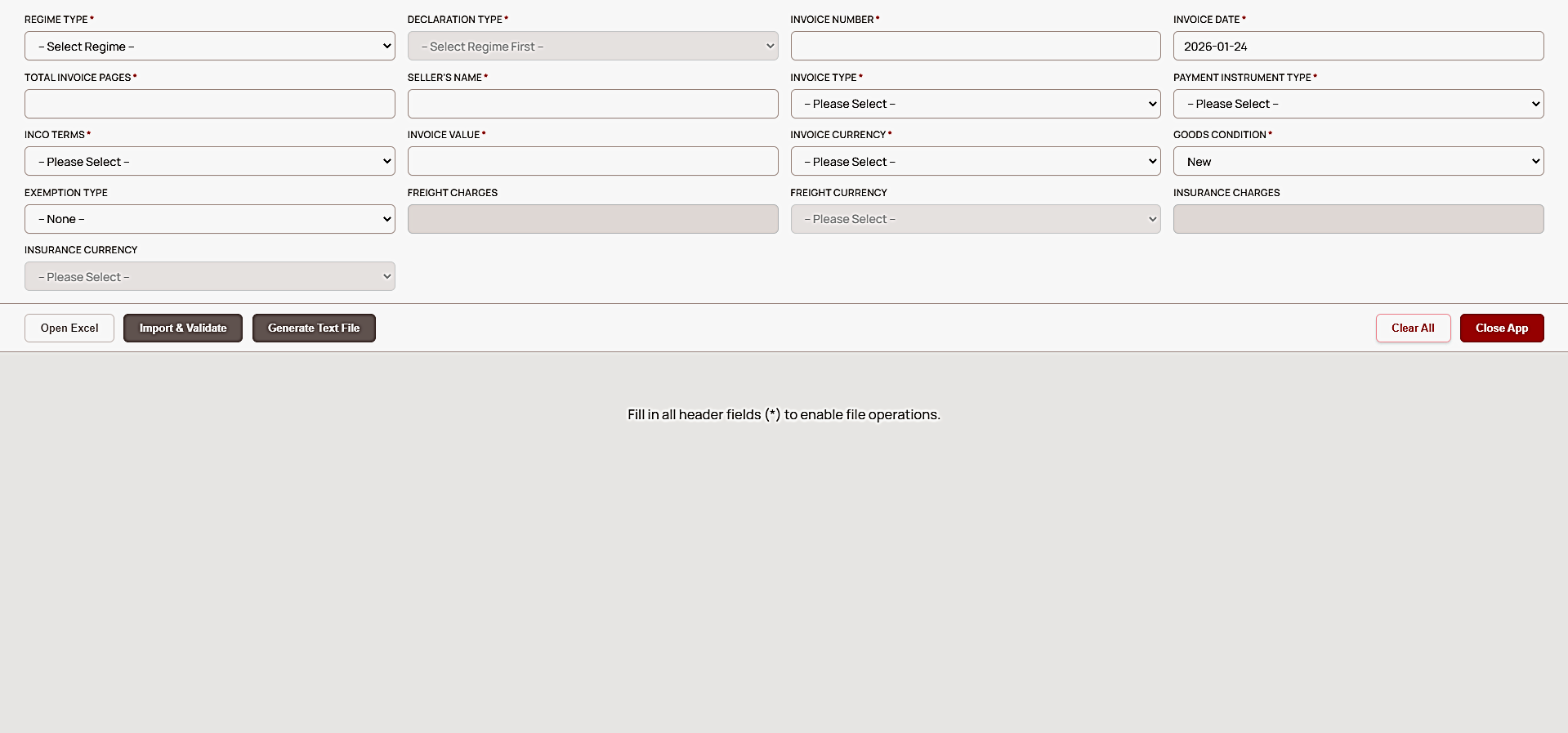
What the app looks like
Main screen — import your Excel invoice
FAQ
Common questions
Does M2 Generator upload my invoice data anywhere?
No. All conversion and validation happens locally on your Windows PC. Your Excel files and invoice data are never uploaded to a server.
What file format does M2 Generator produce?
M2 Generator converts your Excel invoice into an upload-ready Mirsal 2 declaration XML file formatted for the Dubai Trade portal.
Does M2 Generator validate HS codes?
Yes. M2 Generator runs built-in rule checks for 8 and 12 digit HS codes, flags controlling-authority-regulated codes, and checks unit-of-measure consistency before export.
Which operating systems does M2 Generator support?
M2 Generator is a desktop application built for Windows 10 and Windows 11.
How do I activate M2 Generator after installing it?
After installation, contact support at support@m2-generator.com to have your license activated for your device.
Privacy Policy
This Privacy Policy describes how the independent developer of M2-Generator software ("Developer", "we", "us", "our") collects, processes, stores, uses, and protects personal data in connection with the installation and use of the M2-Generator software application ("Software").
By installing, accessing, or using the Software, you acknowledge that you have read, understood, and agreed to the collection and processing of your data in accordance with this Privacy Policy and the applicable laws of the United Arab Emirates.
The Software collects a hardware-based identifier generated through a one-way cryptographic hashing process applied to your motherboard serial number or equivalent system identifier, and the resulting hashed hardware identifier ("HWID") is used exclusively for digital rights management, device binding, and license enforcement purposes in order to ensure a single-device license per user. Your actual hardware serial number is never stored, retained, transmitted, or made visible to the Developer in any form. In addition to the hashed HWID, the Software may collect limited account and license metadata including license identifier, activation timestamp, and strictly necessary technical or security logs for debugging, fraud prevention, customer support, and system integrity purposes.
All personal data is processed solely for digital rights management, license enforcement, fraud and abuse detection, customer support, and compliance with applicable legal obligations, and the legal basis for such processing under UAE Federal Decree-Law No. 45 of 2021 (Personal Data Protection Law) is the performance of a contract and your consent as evidenced by your installation and use of the Software.
Data collected through the Software is stored using Google Firebase infrastructure, which may involve servers located outside the United Arab Emirates, including in the United States, and by using the Software you expressly acknowledge and accept the cross-border transfer of encrypted or hashed identifiers and related license data to such servers. The Developer retains personal data only for as long as your account remains active and for a reasonable period thereafter for legal, security, audit, or defense purposes unless a longer retention period is required by applicable law.
The Developer implements commercially reasonable technical and organizational safeguards including one-way hashing of hardware identifiers, encrypted data transmission, and restricted system access; however, no system is completely secure and you acknowledge and accept that use of the Software and any network-based services occurs entirely at your own risk. You have the right to request access to, correction of, or deletion of your personal data if any by contacting support@m2-generator.com, subject to applicable law and legitimate retention obligations.
The Developer may update this Privacy Policy from time to time, and your continued use of the Software after any such update constitutes acceptance of the revised policy.
Terms & Conditions
End-user license agreement / terms and conditions. Effective date: January 1, 2026. Software: M2-Generator.
By installing, activating, or using the Software, you agree to be bound by this End-User License Agreement ("Agreement") and the Privacy Policy, and if you do not agree you must not install/use the Software and must uninstall it immediately. The Software is licensed, not sold, and subject to your compliance with this Agreement you are granted a non-exclusive, non-transferable, revocable, single-device license to install and use the Software solely for lawful purposes.
The Software automatically binds to the first device on which it is launched using a hashed hardware identifier, and any attempt to bypass, spoof, crack, tamper with, or otherwise circumvent the license system, digital rights management, or device binding mechanism constitutes a material breach of this Agreement and may violate UAE Federal Decree-Law No. 34 of 2021 on Cybercrimes and applicable international copyright laws, and can be prosecuted to the fullest extent of the law.
You shall not reverse engineer, decompile, disassemble, modify, distribute, mirror, resell, sublicense, rent, lease, or otherwise make the Software available to any third party, nor shall you use the Software for any unlawful, fraudulent, or malicious purposes. All sales are final and there is no refund policy; no refunds, chargebacks, cancellations, or credits will be provided under any circumstances. The Software is provided "as is" and "as available," without any warranties of any kind, express or implied, including without limitation warranties of merchantability, fitness for a particular purpose, non-infringement, accuracy, reliability, or availability, and the Developer does not guarantee that the Software will be error-free, uninterrupted, or compatible with all systems.
The Software may produce outputs, conversions, or results that are inaccurate, incomplete, or erroneous, and you acknowledge and agree that you are solely responsible for verifying all outputs before submitting them to any government authority, customs system, third-party platform, or other entity, and the Developer accepts no liability whatsoever for any consequences, losses, damages, penalties, or claims arising from your reliance on such outputs. We update the HS Code and Controlling Authority database based on information received from Customs. Any changes identified or reported by users are verified through Dubai Trade and/or the Al Munasiq application and updated in the software within 24 hours of verification.
We are not responsible for any HS Code that does not exist, becomes invalid, or for any Controlling Authority information that is missing or differs from Customs records. HS Codes and Controlling Authorities are subject to change at the sole discretion of Customs at any time and without prior notice.
To the fullest extent permitted by applicable law, the Developer does not guarantee uninterrupted access. Service may be suspended for maintenance or server outages without notice or liability and shall not be liable for any indirect, incidental, consequential, special, exemplary, or punitive damages, including without limitation loss of profits, loss of data, loss of business, system failures, network outages, third-party service failures, or software conflicts, even if advised of the possibility of such damages, and the Developer's total liability for any claim arising out of or relating to this Agreement or the Software shall in no event be applicable, if any.
You agree to indemnify and hold harmless the freelance developer (Muhammad Zaid) from and against any claims, damages, losses, liabilities, costs, and expenses arising from your breach of this Agreement, your misuse of the Software, or your violation of any applicable law. The Developer may suspend or terminate your license at any time without notice and without refunds, credits, damages, or compensation of any kind for breach, suspected misuse, security reasons, and discontinuation, and upon termination you must cease all use of the Software and uninstall it.
This Agreement shall be governed by the laws of the United Arab Emirates, subject to mandatory consumer protections, and any dispute arising under or in connection with this Agreement shall be subject to the jurisdiction of the courts of the United Arab Emirates. Nothing in this Agreement excludes or limits any rights you may have under mandatory UAE law.
The Developer may update these Terms and Conditions from time to time, and your continued use of the Software after any such update constitutes acceptance of the revised Terms and Conditions.
For any questions or legal requests, you may contact support@m2-generator.com.